How to Write a GPU Module
This guide explains how to write Vistle modules that can be run on the GPU. It assumes you are familiar with the basics on how to write a Vistle module.
Vistle makes use of the portable toolkit Viskores. It was originally developed as VTK-m (Bolstad et al., 2023[1]), and this still shows in many places within Vistle. It allows running scientific visualization algorithms on various devices, including GPUs, and is designed to keep data transfers between devices at a minimum.
Overview
The VtkmModule Class
The class VtkmModule is the base class for Viskores modules in Vistle. It is designed to make adding new Viskores algorithms, so-called filters, as simple as possible by providing core functionality for handling the input data, passing it to the filter implemented by the derived class, and writing the filter result to the output ports. At the same time, it is meant to be flexible, allowing the derived class to customize and extend these processes, if desired.
In order to implement a module wrapping a filter provided by or relying on Viskores, one implements a class deriving from VtkmModule.
Note: The class VtkmModule derives from Module, i.e., many of its features, like the functionality for adding module parameters, can be used by Viskores modules, too.
The Constructor
The VtkmModule constructor, which the derived class should call in its own constructor, creates the input and output ports of the Viskores module.
VtkmModule(const std::string &name, int moduleID, mpi::communicator comm, int numPorts = 1, MappedDataHandling mode = MappedDataHandling::Require);
By default, a Viskores module provides one input port and one output port, but additional ports can be added by specifying the desired number in the base constructor (numPorts). Note that all data on the input ports must be defined on the same grid, as the module will throw an error, otherwise.
Many Viskores filters work on data fields, so, by default, a Viskores module expects the data at the input ports to contain mapped data in addition to a grid and will throw an error if there is none. The MappedDataHandling mode can be changed, if desired:
Use: keep the existing mapped data and use it as isRequire: mapped data is mandatory; if it is missing, the module aborts with an errorDiscard: mapped data is ignored and removed before exporting to ViskoresGenerate: if mapped data is absent, the module creates it automatically so the filter can still run
Defining the Viskores Filter
The setUpFilter method, which must be implemented by the derived class, creates, sets up and returns the desired Viskores filter that will be called on the input data.
virtual std::unique_ptr<viskores::filter::Filter> setUpFilter() const = 0;
If the Viskores module has multiple input ports, the filter will only be applied to the data on the first input port, i.e., the filter’s active field is set to the field on the first port. The fields on the remaining ports will be mapped to the resulting output grid.
Preparing the Input Data
The VtkmModule class defines its own struct called InputData for encapsulating the input data in both the Vistle and the Viskores data formats:
struct InputData {
    vistle::Object::const_ptr vistleGrid;
    std::vector<vistle::DataBase::const_ptr> fields;

    viskores::cont::DataSet viskoresDataset;
};
The struct makes sure that the modules have access to all the information they need when preparing the input (or output) for the filter.
The prepareInputGrid method transforms the input grid into a Viskores cellset and adds it to the Viskores dataset inside input. Similarly, prepareInputField, which is called once per field, transforms the input fields into Viskores array handles and adds them to input.viskoresDataset as well. The filter will, subsequently, be applied to input.viskoresDataset.
virtual ModuleStatusPtr prepareInputGrid(InputData &input) const;

virtual ModuleStatusPtr prepareInputField(const vistle::Port *port, InputData &input, int index) const;
A Viskores module only performs very basic checks on the input ports while reading in the data, i.e., in the readInPorts method: It ensures each input port contains data as long as its corresponding output port is connected. Additionally, it makes sure that at least one input grid provides an input grid and that all data fields are defined on the same grid.
Some filters might, however, require additional checks on the input data. These can be added by overriding prepareInputGrid and/or prepareInputField as needed.
Preparing the Output Data
Similar to the input struct, the VtkmModule class also contains a struct (called OutputData) for the output data:
struct OutputData {
    vistle::Object::const_ptr vistleGrid;
    std::vector<vistle::DataBase::ptr> fields;

    viskores::cont::DataSet viskoresDataset;
};
prepareOutputGrid and prepareOutputField, which is called once per field, transform the filter result into the Vistle format, so it can be added to the module’s output ports.
virtual vistle::Object::const_ptr prepareOutputGrid(const InputData &input, OutputData &output) const;

virtual vistle::DataBase::ptr prepareOutputField(const InputData &input, OutputData &output, int index, const std::string &fieldName) const;
By default, the Viskores module simply copies the attributes from the input grid and fields to the output grid and fields, respectively. It also sets the output field’s grid to the output grid. To account for possible attribute changes after applying the filter, e.g., when the filter changes the field’s mapping from element- to cell-based, the derived class can override these two methods as needed.
Example 1: Basic usage
This first example illustrates how to use the base functionalities of the VtkmModule class. It will create a Viskores module MyIsosurfaceVtkm which calls Viskores’s Contour filter to generate an isosurface.
The Header
Let’s first inspect the new module’s header file:
#ifndef VISTLE_MYISOSURFACEVTKM_MYISOSURFACEVTKM_H
#define VISTLE_MYISOSURFACEVTKM_MYISOSURFACEVTKM_H

#include <vistle/vtkm/vtkm_module.h>

class MyIsosurfaceVtkm: public vistle::VtkmModule {
public:
    MyIsosurfaceVtkm(const std::string &name, int moduleID, mpi::communicator comm);

private:
    vistle::FloatParameter *m_isovalue;

    std::unique_ptr<viskores::filter::Filter> setUpFilter() const override;
};

#endif
As the goal is to use Viskores to run the algorithm on the GPU, the module inherits from the VtkmModule class which is defined in vistle/vtkm/vtkm_module.h:
class MyIsosurfaceVtkm: public vistle::VtkmModule {
Because of inheriting from said class, MyIsosurfaceVtkm must override the setUpFilter() method to prepare the desired filter to be applied to the input dataset:
std::unique_ptr<viskores::filter::Filter> setUpFilter() const override;
The Contour filter needs an isovalue. Since VtkmModule inherits from the Module class, we can simply define a float parameter for this purpose:
vistle::FloatParameter *m_isovalue;
The Source File
Next, the corresponding source file will be discussed:
#include <viskores/filter/contour/Contour.h>

#include "MyIsosurfaceVtkm.h"

MODULE_MAIN(MyIsosurfaceVtkm)

using namespace vistle;

MyIsosurfaceVtkm::MyIsosurfaceVtkm(const std::string &name, int moduleID, mpi::communicator comm)
: VtkmModule(name, moduleID, comm, 2)
{
    m_isovalue = addFloatParameter("isovalue", "isovalue", 0.0);
}

std::unique_ptr<viskores::filter::Filter> MyIsosurfaceVtkm::setUpFilter() const
{
    auto filter = std::make_unique<viskores::filter::contour::Contour>();
    filter->SetIsoValue(m_isovalue->getValue());

    return filter;
}
Like any Vistle module, Viskores modules must also call the MODULE_MAIN function to make sure it is integrated correctly into the software:
MODULE_MAIN(MyIsosurfaceVtkm)
The constructor must call the base constructor:
MyIsosurfaceVtkm::MyIsosurfaceVtkm(const std::string &name, int moduleID, mpi::communicator comm)
: VtkmModule(name, moduleID, comm, 2)
{
    m_isovalue = addFloatParameter("isovalue", "isovalue", 0.0);
}
The base constructor lets us choose the number of ports (here, it is two). This means that the Contour filter will use the data field on the first input port to create the isosurface. The data on the second port will then simply be mapped to the resulting geometry.
The constructor can be used to define module parameters, such as the isovalue in this case.
Finally, we create a Contour filter in the setUpFilter method, pass the isovalue to it and return it:
std::unique_ptr<viskores::filter::Filter> MyIsosurfaceVtkm::setUpFilter() const
{
    auto filter = std::make_unique<viskores::filter::contour::Contour>();
    filter->SetIsoValue(m_isovalue->getValue());

    return filter;
}
Adding the Module to Vistle
Adding a Viskores module to Vistle is similar to adding a regular module to Vistle. In the module’s CMakeLists.txt, we call the add_vtkm_module target which makes sure the correct Viskores libraries are linked in addition to all necessary Vistle libraries:
set(HEADERS MyIsosurfaceVtkm.h)
set(SOURCES MyIsosurfaceVtkm.cpp)

add_vtkm_module(MyIsosurfaceVtkm "Basic GPU module using Viskores's Contour filter" ${HEADERS} DEVICE_SOURCES ${SOURCES})
Note the use of the keyword DEVICE_SOURCES, which is particularly important for Viskores modules consisting of multiple source files. It ensures that the files are processed correctly by device compilers such as nvcc.
Then, we must choose the module category which fits best and add the new subdirectory to the corresponding CMakeLists.txt file:
add_subdirectory(MyIsosurfaceVtkm)
The Result
The code above produces a Vistle module MyIsosurfaceVtkm which consists of two input and output ports as well as a float parameter to set the isovalue and which calculates the isosurface using Viskores’s Contour filter.
The data field on the first input port is used to calculate the isosurface. In the following example workflow, MyIsosurfaceVtkm reads in the data field named scalar and uses it to create an isosurface of isovalue 1.1:
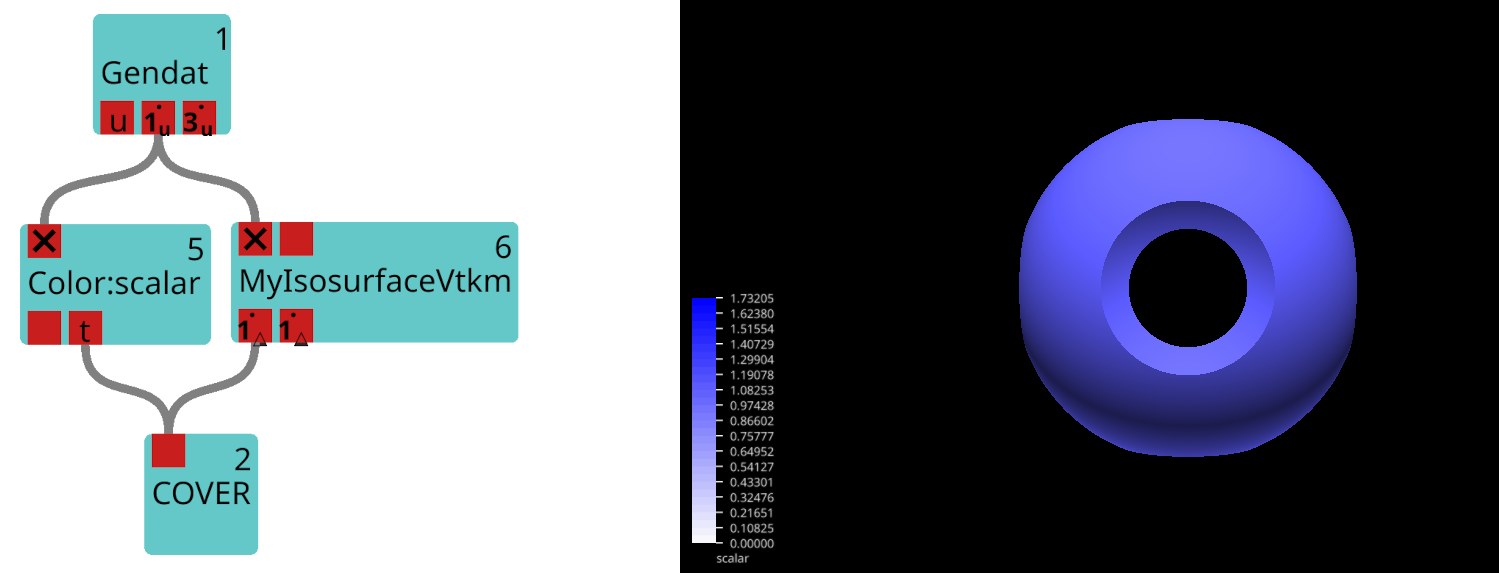
Since scalar is the data field on the first input port and was thus used as the filter’s active field, the data field on the first output port is uniform on the resulting output geometry.
For comparison, a second input field called vector_z is connected to IsosurfaceVtkm in the following example workflow:
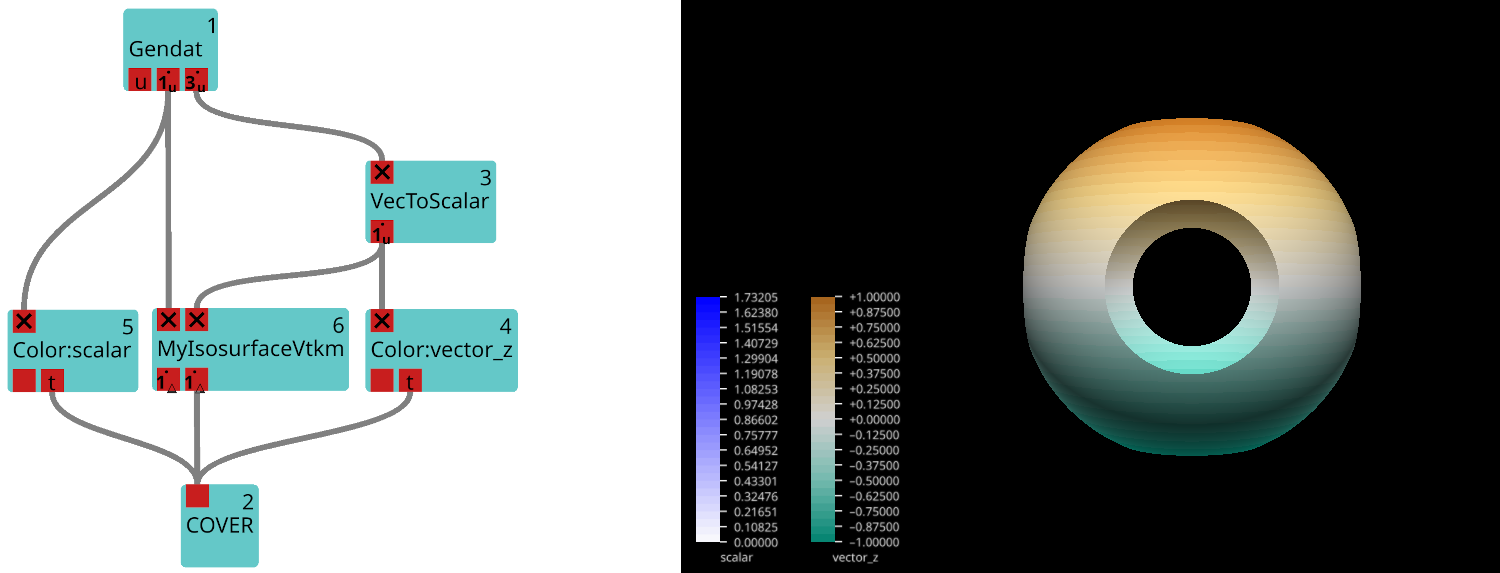
The resulting geometry remains the same because the data on the first input port and the isovalue have not changed. The second output port returns the data field vector_z mapped to the output grid, which leads to a different coloring of the geometry.
Example 2: Extending the Core Functionality
In this second example, the derived class will change the methods for handling its input and output data. The new class MyCertToVellVtkm will call the Point Average filter to transform a cell-based data field into an equivalent vertex-based field. It, however, only applies the filter if the input data is cell-based. If not, it simply adds the input field to the output port.
The Header File
To implement the desired behaviour, MyCellToVertVtkm overrides the prepareInputField, prepareOutputGrid and prepareOutputField methods:
#ifndef VISTLE_MYCELLTOVERTVTKM_MYCELLTOVERTVTKM_H
#define VISTLE_MYCELLTOVERTVTKM_MYCELLTOVERTVTKM_H

#include <array>
#include <vistle/vtkm/vtkm_module.h>

class MyCellToVertVtkm: public vistle::VtkmModule {
public:
    MyCellToVertVtkm(const std::string &name, int moduleID, mpi::communicator comm);

private:
    ModuleStatusPtr prepareInputField(const vistle::Port *port, InputData &input, int index) const override;

    std::unique_ptr<viskores::filter::Filter> setUpFilter() const override;

    vistle::Object::const_ptr prepareOutputGrid(const InputData &input, OutputData &output) const override;

    vistle::DataBase::ptr prepareOutputField(const InputData &input, OutputData &output, int index,
                                             const std::string &fieldName) const override;
};

#endif
The Source File
The following is MyCellToVertVtkm’s complete source file. In this section, the overridden methods will be explained one by one.
#include <viskores/filter/contour/Contour.h>
#include <viskores/filter/field_conversion/PointAverage.h>

#include "MyCellToVertVtkm.h"

MODULE_MAIN(MyCellToVertVtkm)

using namespace vistle;

MyCellToVertVtkm::MyCellToVertVtkm(const std::string &name, int moduleID, mpi::communicator comm)
: VtkmModule(name, moduleID, comm)
{}

std::unique_ptr<viskores::filter::Filter> MyCellToVertVtkm::setUpFilter() const
{
    return std::make_unique<viskores::filter::field_conversion::PointAverage>();
}

ModuleStatusPtr MyCellToVertVtkm::prepareInputField(const vistle::Port *port, InputData &input, int index) const
{
    auto field = input.fields[index];
    auto mapping = field->guessMapping(input.vistleGrid);

    if (mapping == DataBase::Element) {
        return VtkmModule::prepareInputField(port, input, index);
    }
    return Info("No need to apply filter to port " + port->getName());
}

vistle::Object::const_ptr MyCellToVertVtkm::prepareOutputGrid(const InputData &input, OutputData &output) const
{
    return input.vistleGrid;
}


vistle::DataBase::ptr MyCellToVertVtkm::prepareOutputField(const InputData &input, OutputData &output, int index,
                                                           const std::string &fieldName) const
{
    // if filter was applied ...
    if (output.viskoresDataset.HasField(fieldName)) {
        // ... add its output to the output port
        auto outputField = VtkmModule::prepareOutputField(input, output, index, fieldName);
        outputField->setMapping(DataBase::Vertex);
        return outputField;
    } else {
        // ... otherwise just copy the input field
        auto ndata = input.fields[index]->clone();
        ndata->setGrid(input.vistleGrid);
        updateMeta(ndata);

        return ndata;
    }
}
Like any Viskores module, MyCellToVertVtkm must define and set up its desired filter in the setUpFilter() method:
std::unique_ptr<viskores::filter::Filter> MyCellToVertVtkm::setUpFilter() const
{
    return std::make_unique<viskores::filter::field_conversion::PointAverage>();
}
Before transforming the input field into a Viskores field, MyCellToVertVtkm first determines the field’s mapping using the guessMapping method. If the field is element-based (=cell-based), the prepareInputField method of the base class is called to add the field to the Viskores dataset that will be passed to the Viskores filter. Otherwise, nothing happens, only an informational message will be printed to the GUI.
ModuleStatusPtr MyCellToVertVtkm::prepareInputField(const vistle::Port *port, InputData &input, int index) const
{
    auto field = input.fields[index];
    auto mapping = field->guessMapping(input.vistleGrid);

    if (mapping == DataBase::Element) {
        return VtkmModule::prepareInputField(port, input, index);
    }
    return Info("No need to apply filter to port " + port->getName());
}
Note: ModuleStatusPtr is used to pass module states to VtkmModule which handles the states through its checkAndNotify method. Currently, there are four states: Success(), Info(const std::string &message), Warning(const std::string &message), Error(const std::string &message). Returning the latter three, results in VtkmModule printing message to the GUI’s Vistle Console. Returning an Error state will stop the execution of the module, but not cause Vistle to crash.
In this example, the output grid is the same as the input grid. As there is no reason to convert the filter’s output grid back to Vistle, we can skip this step:
vistle::Object::const_ptr MyCellToVertVtkm::prepareOutputGrid(const InputData &input, OutputData &output) const
{
    return input.vistleGrid;
}
Note, however, that you should not return a nullptr here, otherwise the output ports will remain empty, even if the filter did produce a valid output.
The field we return in the prepareOutputField method is the field that will be passed to the output port (as long as the field is not a nullptr, in that case only the output grid will be added to the port). We can use this to achieve the desired behavior: If the filter was applied, i.e., the input data field was cell-based, we want to add the filter’s result to the output port.
If the filter was not applied, i.e., the input field was vertex-based, we simply add the input field to the output port.
vistle::DataBase::ptr MyCellToVertVtkm::prepareOutputField(const InputData &input, OutputData &output, int index,
                                                           const std::string &fieldName) const
{
    // if filter was applied ...
    if (output.viskoresDataset.HasField(fieldName)) {
        // ... add its output to the output port
        auto outputField = VtkmModule::prepareOutputField(input, output, index, fieldName);
        outputField->setMapping(DataBase::Vertex);

        return outputField;
    } else {
        // ... otherwise just copy the input field
        auto ndata = input.fields[index]->clone();
        ndata->setGrid(input.vistleGrid);
        updateMeta(ndata);

        return ndata;
    }
}
By default, VtkmModule::prepareOutputField sets the output field’s grid to the output grid (which we have previously set to the input grid) and additionally copies the input field’s attributes to the output field. As the filter changed the field’s mapping, we must set it to vertex-based using setMapping.
The Result
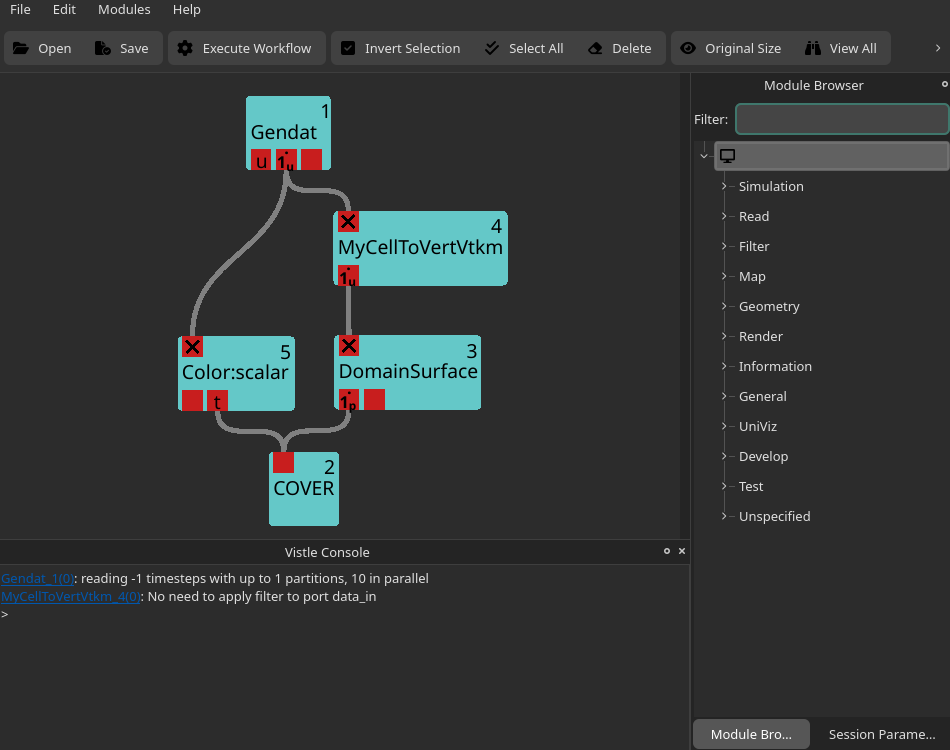
The code above creates the MyCellToVertVtkm module which consists of one input and one output port. It checks if it makes sense to apply the Point Average filter to the input field, i.e., it checks if the input field is cell-based. If so, the filter is applied. If not, an informational message is printed to the Vistle Console:
Custom Viskores Filters
For simplicity, predefined Viskores filters have been used for the two examples above. Please note, that VtkmModule can, of course, also be used to add custom Viskores filters to Vistle. To learn more about implementing custom Viskores filters, check out Viskores’s user guide (Moreland, 2024[2]).
How to Configure Vistle to Run Viskores Modules on the GPU
Viskores is an open-source software that can be obtained through GitHub. It was added as submodule to the Vistle repository, so that Vistle can handle configuring Viskores appropriately for the user.
CUDA build
This build is recommended for NVIDIA GPUs.
To compile Vistle with the CUDA version of Viskores, run the following commands from your build directory:
cmake -DVISTLE_USE_CUDA=ON ..
make
Make sure the CUDA compiler is found (e.g., by checking CMAKE_CUDA_COMPILER after configuring cmake) before compiling, otherwise the CPU version of Vistle will be built.
Kokkos build
This build has been tested on AMD and NVIDIA GPUs.
To compile Vistle with the Kokkos version of Viskores, you will first need to install Kokkos on your system and enable the desired backends. You can either install it with the package manager of your choice or by yourself from source (see Kokkos’s GitHub repository). In the latter case, please consult the Kokkos documentation for the appropriate build options for your system.
Important: Make sure Kokkos_ENABLE_THREADS is OFF.
Once Kokkos is installed, run the following commands from your Vistle build directory:
cmake -DVISTLE_USE_KOKKOS=ON ..
make
If Kokkos isn’t found automatically (which is typically the case if Kokkos was installed in a non-standard location), add -DKokkos_DIR=<path to your Kokkos installation>/lib/cmake/Kokkos to the cmake command.
Vistle will detect which backends have been enabled in your Kokkos build and configure the Viskores submodule accordingly.
Please note: If you enabled the CUDA version of Kokkos, Vistle will build both the CUDA and Kokkos (+CUDA) version of Viskores. By default, Viskores prefers CUDA over Kokkos. To make Vistle use the Kokkos version of Viskores, set the VISKORES_DEVICE environment variable to Kokkos before running vistle:
export VISKORES_DEVICE=Kokkos
vistle
NOTE: All environment variables recognized by viskores::cont::Initialize can be used, including VISKORES_LOG_LEVEL which can be helpful for debugging.